Skeuomorphism

There’s been a lot of debate in the design world lately about skeuomorphism. You may not be familiar with this term and I have to admit that it was new to me until a few months ago. By the way, it’s pronounced skyoo-a-morf and comes from the Greek words for tool and shape.

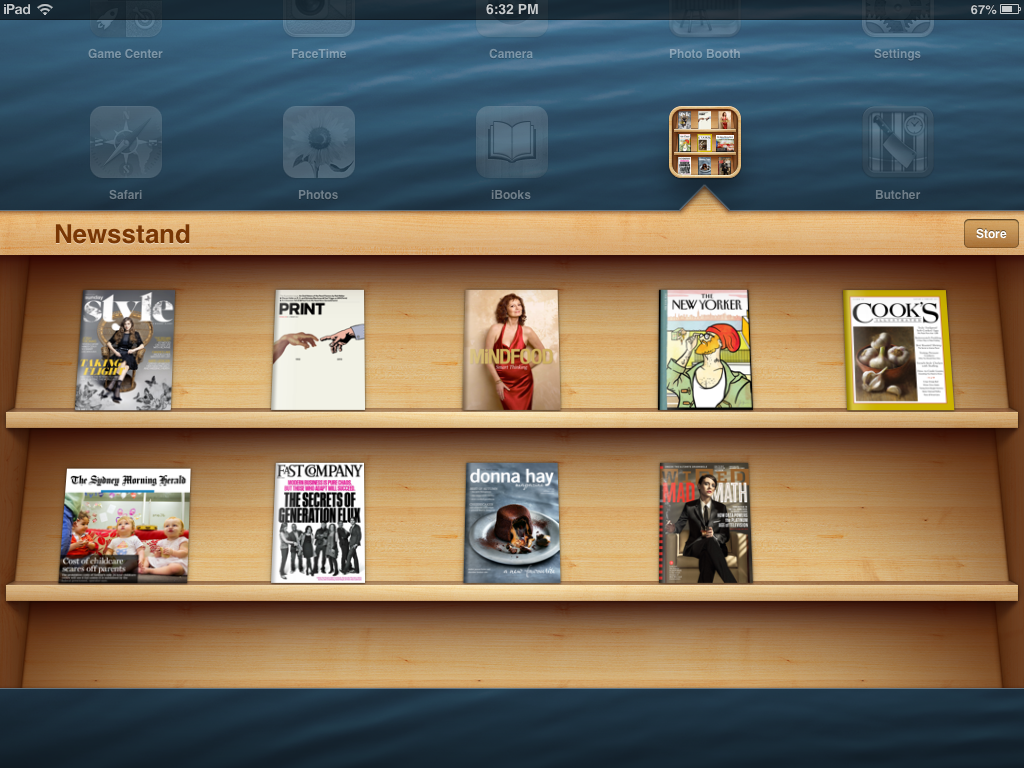
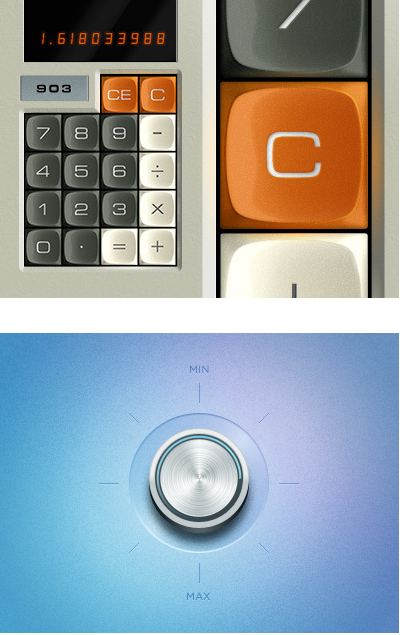
Basically, skeuomorphism is when some or all of the elements in a design look like the objects that they represent, rather than having a flat representational design. Skeuomorphic objects have digitally created textures (for example simulated woodgrain or leather stitching) that look just like the real thing.

Probably the best way to explain this is by giving you some examples. The most obvious one that comes to mind is the classic iBook bookshelf.
skeuomorph
Classic example of a woodgrain texture
Skeuomorphic design
Just like the real thing.

Skeuomorphic designs are used used to give people the impression that the app or website is friendly and easy to use. Because we are familiar with the object being represented (we all know how buttons work after all),  we unconsciously believe that our interaction will be positive.

So why is there a debate?

Let’s start off by saying that in the design world  there are always debates between minimalists (people who like clean uncluttered design) and those who like more flourishes. I probably fall into the first category as I have quite a fondness for white space. Whilst I think that skeumorphic designs are friendly, (and very clever from a graphic design perspective), I don’t always find the apps on my iPad that easy to use and I often find this quite frustrating. It’s as if someone has put a lot of effort into making something look easy to use, but the reality is that sometimes it’s not really all that obvious how the darned thing works. It’s kind of like the app is saying ‘I’m so easy to use, any fool can work this out’ – except me, apparently. When I try and use an app with a lovely friendly interface, and I can’t figure out how it works, it’s somehow more frustrating than when I try to use an application that looks complicated.

Skeuomorphic design is definitely going out of favour in the graphic design world and flat design is coming back in, however it’s still really big in the e-learning world and it’s finding favour in presentation design lately. I’ve been seeing a fair few blackboards and corkboards popping up in presentations recently, so if you are looking for something to spice up your presentation you could have a play around with skeuomorphism. At least you’ll know how to pronounce it!


Enhanced by Zemanta

Posters old and new

I’ve been having an interesting conversation with the lovely Emma about lactivism (that’s a newly coined term for people who think that women should be able to breastfeed their babies in public places without being abused – something I agree with wholeheartedly). She has produced a great radio story for International Women’s Day about it. You can listen to it here:

http://www.facebook.com/l/FAQHaZCDRAQHLBDfs3oYAK9a02f-_naVC5Wlm1cwNYZTTMg/doublexshow.podomatic.com/entry/2013-03-27T22_40_36-07_00

We were talking about the fact that women have been protesting about this for many years, although its true that the issue has had a lot of press in Australia recently.

This led me to exploring posters that support breastfeeding which I thought I would share with you because they are interesting from a design perspective as well as from an historical perspective.

This first example is from the 1930s and is very typical of the poster design of that period, known as Art Deco.

Breastfeeding poster

Art Deco posters typically have very flat colours, geometric shapes, bold forms, airbrushing and stylised people.

Here are a couple of more recent posters that I just like the design of. Both use photography and some nice typography to get their message across. I like the fact that they are both bold and to the point.

Breastfeeding poster

Pink - breastfeeding poster


All of these posters are from Double Think. Check it out if you would like to see more.

Enhanced by Zemanta

Once I had a secret love – content strategy and me

I’ve been wanting to write about content strategy for a while now, but I’ve been put off by not knowing how to make it relevant to the readers of this blog (that’s you). It struck me that my desire to provide material that is relevant, interesting and informative is exactly the problem that having a content strategy is meant to solve. Let me explain…

Content strategy is about trying to develop a coherent package of information for your audience. It’s about planning and managing information. I think of it as information wrangling, with the audience in mind. The term content strategy is most commonly used in relation to website development and was coined by Rachel Lovinger. Lots of people think that content strategy is just a new term for having an editorial policy, but it’s much more than that.

The role of the content strategist is to develop material that is readable, understandable, findable, useable and able to be shared. This requires a deep understanding of what people want and need to know, and how people consume information. These days, anyone who develops information needs to appreciate that if the audience finds the material useful, they will probably want to share it with other people. You need to make it easy for people to do this. On a website, this involves using sharing buttons, such as the ones at the bottom of this page. For bigger companies, it means making information downloadable and accessible.

Foremost, it requires you to develop material that is readable and understandable.

So how does this relate to the work you do on an everyday basis? The more I read about content strategy, the more it appeals to me. When I look at overcrowded documents, or cluttered websites, I think about how much better they would be if only someone stopped to think about who would be reading the document, who would be visiting the website and what do they want to know? Imagine if you could produce presentations that were clear and relevant, and really focussed on the audience – wouldn’t that be great?

So next time you are asked to write a report or develop a presentation, ask yourself:

  • who is this for? 
  • what might their interests be? 
  • what do they need to know?
  • how might they want to share this information?

This leads me to the dilemma I outlined at the beginning of this post – how do I know what is relevant, interesting and informative for you? Without some feedback from you, I’m really only guessing, so feel free to ask a question or share an idea. I’ve love to provide more of what you are interested in, so do let me know.

Best presentation designers

We all have days when we need inspiration, especially when the weather outside is wet and miserable. It may be sunny in your part of the world, but my little corner of the world is soggy. Today’s post features two of my favourite presentation designers.

Presentation Zen

When I started designing presentations, the first designer I discovered was Garr Reynolds and his site Presentation Zen. Garr’s work features big bold visuals with minimal text and a distinctive look and feel. I have bought most of his books and recommend them for people starting out. His blog covers not only design tips, but articles on presentation techniques, storytelling and audience engagement.

Duarte Design

Almost simultaneously, I discovered Nancy Duarte and instantly became a big Nancy fan. Duarte made her name designing the presentation slides for Al Gore’s ground breaking climate change keynote An Inconvenient Truth. The graphics created by Duarte for the keynote were later used in the award winning documentary of the same name. I strongly recommend that you check out her website and if you need a book on presentation design, buy this one.

 The downside

One of the problems with looking at other people’s work is that you can become disheartened and disillusioned, especially if you work in an environment that doesn’t really appreciate creativity. Your efforts to do something even a little bit different might be met with indifference or derision. You may not be able to get away with using big bold graphics or full screen images.

If this is the situation that you’re in, I suggest you try to make small changes rather than trying something radical. Sometimes it can be a major achievement to simplify your slides and make them clear, short and to the point. This is relatively easy to achieve and doesn’t ruffle too many feathers.

Make a start today

Changing the culture in a workplace is a long slow process. Managers need to be convinced that simple, understandable presentations are far superior to ones which bamboozle and baffle their audiences. Try to make small changes and encourage everyone in your workplace to get to the point as quickly as possible and write clearly. Who knows, with time you may be able to add some relevant images!

Let me know if you have any challenges that I can help you with, or successes that you’d like to share.


Enhanced by Zemanta

Where have all the commas gone?

I have been enjoying reading a children’s book called The Silver Brumby by Elyne Mitchell. It’s quite a famous Australian book, first published in 1958. For those of you who don’t live here in Australia, brumbies are a type of wild horse, most commonly found in the Snowy Mountains.

One of the interesting things I noticed in this beautifully written book is the proliferation of commas. They are used with gay abandon. Actually the word ‘gay’ is used with gay abandon as well. How times have changed. Anyway, the book begins like this…

Once there was a dark, stormy night in spring, when, deep down in their holes, the wombats knew not to come out, when the possums stayed quiet in their hollow limbs, when the great black flying phalangers (a type of glider – see photo below) that live in the mountain forests never stirred. In this night, Bel Bel, the cream brumby mare, gave birth to a colt, pale like herself, or paler, in that wild, black storm.

250px-Sugies03_hp

Wow, look at all those commas! You don’t see them being used this much in contemporary writing but I think they give the writing a beautiful cadence that it wouldn’t have otherwise.  Judging by the writing that passes over my desk most days, it seems that the comma has quite gone out of fashion and I think this is a pity.

According to my son and his girlfriend, most young people are taught that they should never use a comma before the word ‘and’ and you should never start a sentence with and. Both of these rules are quite wrong, in my humble opinion. My favourite writing blog Grammar Girl says that we should definitely be using a comma before ‘and’ when it is being used to separate the items in a list.

This is called the Oxford (or serial) comma, and it’s important because it adds clarity to your writing.

Here’s an example straight from Gramma Girl… Rebecca was proud of her new muffin recipes: blueberry, peanut butter and chocolate chip and coconut.

The absence of any commas after peanut butter makes it unclear how many types of muffins there are. There could be one recipe involving all three ingredients, or three different types of muffins: peanut butter, chocolate chip, and coconut. A serial comma in the appropriate place would help you identify the number of items in the list.

The serial comma helps things to make sense, so don’t be afraid to use it when it’s called for. After all, our aim is to help people to understand what we are saying, so you should be trying to make this as easy as possible.

Enhanced by Zemanta

Logo love

I have a slight obsession with logos. Not all logos of course, just the really clever, witty ones. The ones I like best are a little bit quirky and often have an emotional element. Well designed logos send good, clear messages that accurately portray the product or company. A really good logo captures the essence of an idea and wraps it up neatly into a small but effective parcel. I think this is what appeals to me.

People have different tastes, so I know that you and I may not like the same things, but I wondered if you have ever given any thought to all the considerations that go into logo design?

Types of logos

The Coca-Cola logo is an example of a widely-r...
The Coca-Cola logo is an example of a widely-recognized trademark representing a global brand. (Photo credit: Wikipedia)

Logos that are made from words, for example the Coca Cola logo, are more accurately described as wordmarks or logotypes. These text only logos are some of the most famous and recognisable logos in the world.

Combination marks are where the designer has used the name of the product/company or organisation and combined this with a symbol or icon. An example of this is the McDonalds logo, which I won’t reproduce here for obvious reasons! This  elegant logo for a wine company is a lovely example of a combination mark.

Wine Forest Logo

The third type of logos contain just symbols or icons. Famous examples include the Apple logo and the World Wildlife Fund’s iconic panda. I think most people in the world would recognise this distinctive logo.

English: The logo for Apple Computer, now Appl...
English: The logo for Apple Computer, now Apple Inc.. The design of the logo started in 1977 designed by Rob Janoff with the rainbow color theme used until 1999 when Apple stopped using the rainbow color theme and used a few different color themes for the same design. (Photo credit: Wikipedia)

What makes a good logo?

Not only must the design capture the essence of the organisation or product, it needs to be able to be used in a variety of settings. For example, a logo that looks effective on a letterhead, may need to look as smart on the side of a truck.  For this reason, logo designers need to know about typography, print production, digital imaging and graphic design. It’s not enough to have a logo that works on a computer screen but nowhere else, unless that’s the only place it will ever be seen.

Another consideration is that the logo may need to be reproduced in black and white, so it needs to be reasonably simple and preferably distinctive, instantly recognisable and memorable.

Finally, a good logo should be timeless. The last thing a company wants to do is to keep changing their logo. A major re-branding can cost hundreds and thousands of dollars (if not millions) so companies really needs to choose their logo carefully.

You may not be in the business of designing or choosing logos, but I think that paying attention to how a business chooses to represent themselves is both fascinating and illuminating.

If you are interested in learning more about logo design, there are many websites and books you can read. My favourite is David Airey’s Logo Love Design.

Enhanced by Zemanta

Learning by doing

I received an email from a chap who wanted to let me know that I had made quite a few typographic errors on this site, especially in my post on being creative . He said that the text ran awkwardly into the photo caption and he was right, it did look ugly. I’ve fixed it now, but in future I’ll be a lot more careful to check how the blog entries look on different browsers.

He made it pretty clear that I should not be giving people advice about graphic design when my blog contains so many obvious errors. As you can imagine I was a bit flattened by this and it took me a couple of days and some kind words from my husband before I cheered up again.

It did make me have a long hard look at what I am trying to do on this blog, so I thought I would share some of my thoughts with you…

As I have mentioned before, I started this blog primarily to practise my writing. It can be hard to find something to write about, so I decided to write about things that I’m interested in, these being design, visual communication and writing. I come from a family of grammar pedants and general nitpickers, so I really can’t help being interested in these things. Travel along a highway with any member of my family and you will hear a running commentary on why the roadside signs are unclear or confusing and how they could be improved.

So although I was criticised for being a student giving graphic design advice, I actually write about a whole range of topics and don’t consider myself an expert in the area of graphic design.

Graphic design is only one aspect of clear communication and is no more or less important than knowing what it is that you want to say, and being able to express that as clearly as possible. 

It’s true that I am enrolled in a graphic design course, but this is merely out of interest and not because I have any aspirations to become a graphic designer. I simply don’t have the talent. This doesn’t bother me.

Learning about graphic design helps me do my job better, as does reading about how we absorb information and make sense of the world.

I am very much a learner sharing my learning journey with the world. I’m a staunch advocate of learning by doing, so this naturally means that I’ll be making plenty of mistakes along the way.

I also love to teach and this means that I want to share ideas, insights and information with people like you. My hope is that you will find the content useful and interesting (at least some of the time).

I appreciate that publishing my ideas and opinions leaves me open to criticism and that’s okay. Receiving feedback is just part of the learning process and I really do welcome any comments or questions you have, good or bad.

Enhanced by Zemanta

Pantone announces colour of the year

Pantone is a large and influential commercial printing company. They invented the colour matching system. This is a standardised system that gives each precise colour a specific number and means that printers across the world will achieve exactly the same results in their printed materials, regardless of where their press is located. Pantone colours are patented and include metallic colours as well as hues from the traditional colour spectrum.

Every January, Pantone announces their ‘Colour of the Year’ and this has an enormous influence on fashion designers, web designers, florists and pretty much anyone in the design business. The decision about the colour of the year is made behind closed doors and is announced with a flurry of announcements and fanfare.

It will come as no surprise to you that the Pantone colour for 2012 was tangerine. Did you think that all those orange websites, dresses and handbags were just a coincidence? No, it was definitely the trendy colour for last year, but now it’s out of date and we must move on.


This year the colour is emerald.

Not just any old emerald, but Pantone Emerald 17 – 5641. It’s a beautiful colour. Look out for an explosion of greeny/blue in the coming year. You will see it popping up everywhere.

I am really happy that this year’s colour is emerald as it’s one of my favourite colours (hence my new peacock feather header theme). I’m going to use it as often as I can.

What does this mean for you?

You will be able to amaze your friends by telling them why emerald is the ‘in’ colour for 2013.

Enhanced by Zemanta

Slide makeover – Remarkablogger case study

remarkablogger
remarkablogger (Photo credit: johnscotthaydon)

Michael Martine from Remarkablogger runs a business aimed at helping people create and improve their business blogs. I like his attitude and his work. I was looking at his site recently and I noticed that he had created a presentation called ‘how to turn your about page into a secret freelance sales weapon’. You can take a look at it here. As you will see, it’s not a bad presentation, but it’s a fairly uninspiring, so I thought it would make a good case study.

Here are a few things to think about:

Your presentations are an important part of your overall brand.

 It struck me that the presentation wasn’t really branded in any clear way. I would develop slides (or preferably a template) with a colour palette that matched or complemented the colours on my website. The standard issue PowerPoint template that’s been used is uninspiring and clearly indicates that it was a rush job.

Use your slides to promote and advertise your business.

They are as important as your e-books, your newsletter or any other assets and should be given the same amount of time and effort. They’ll often have a long shelf life so it’s worth making them look as good as you can.

Use illustrations whenever and wherever you can.

In the slide below, Michael talks about the importance of your ‘about’ page, and should be illustrating his points using his own site as an example.

Slide1

Reduce the amount of text on your slides.

In the makeover below, I’ve tried to pick out the key points and reduce some of the clutter. I should mention that there is an audio track with the presentation, so the text on the slides only needs to contain the key points. Reducing the amount of text on the slides will reduce cognitive load and make it easier for your audience to absorb the information.

Slide2

You’ll also notice that I’ve emphasised ‘about’ by changing the font and the font colour. It’s important to let your audience know straight away what the slide is about.

Here’s another version with the bullet points separated from the image. This may appeal to you more as its a little cleaner.

Slide3


Provide examples from other sources.

Michael could have used his own page (which is kind of a mixed bag as it contains a fairly lengthy manifesto), or he could have used some of the really great examples on the web. Here’s just one…

Screen shot 2013-01-16 at 10.19.39 PM

In summary, you should endeavour to:

1. Brand your slides so that they are part of your overall package.

2. Use your presentations as a way to promote your business.

3. Use illustrations and examples as much as possible.

4. Reduce the amount of clutter and minimise the text.

Any other ideas? Comments and feedback welcome.

Enhanced by Zemanta

Writing at work

Have you ever been in the situation where you just suddenly forgot whether you should use affect or effect or how to spell accommodation? This happens to me quite a lot, especially at work, and I find it really helpful to have a few good writing books and blogs to refer to when the need arises.

As I may have mentioned before, one of my favourites is Writing at Work  by Neil James from the Plain English Foundation. It’s an excellent reference book and sits on my desk within easy reach, next to the dictionary.

My favourite blog is Grammar Girl (Quick and Dirty Tips for Better Writing) which can answer just about any grammar question you may have, and also has a list of the top mistakes that people make. It’s really useful, easy to understand and often funny.

Future Perfect is the website of a company which offers writing services but also has a heap of free resources including grammar quizzes (don’t we just love quizzes) and good advice about writing, punctuation and proofreading.

These are three of my favourites. Check them out and start improving your writing today. Let me know what you think and if you have any personal favourites.

Enhanced by Zemanta